
Where is the code box?
Lobby upper-right Codes after the tutorial. Exact art may shift in Blasting Off, but recaps agree on upper-right in the lobby shell.

Redeem Survive a Million Monkeys codes in lobby: finish tutorial, open upper-right Codes, paste MONKEYS or SURVIVE, green check for 1000 Gems. Not web redeem.
Lobby after tutorial: Codes sits in the upper-right corner.
~8 min read
How to redeem Survive a Million Monkeys codes means using the lobby Codes control on Place 99409088950210 (gorilla warfare.) — not the Roblox website promo form. Finish the tutorial, open Codes in the upper-right corner of the lobby, paste one exact string from the codes table, confirm, and look for a green check plus 1000 Gems per successful grant. Verified October 4, 2026. Play on Roblox.
Working strings as of October 4, 2026: MONKEYS (official description) and SURVIVE (third-party recap October 4, 2026 — verify on your build). This guide walks the click order, the failure modes that look like “broken codes,” and the boxes you should never paste into.
| Fact | Detail |
|---|---|
| Place | 99409088950210 |
| Developer | gorilla warfare. |
| Redeem UI | Lobby Codes, upper-right (after tutorial) |
| Not this | roblox.com/redeem · public chat · other Places |
| Success signal | Green check + Gems balance increase |
| Working strings | 2 — see codes |
| Devices | Roblox · Desktop, Console, Mobile, Tablet |
| Last checked | October 4, 2026 |
| Verified | October 4, 2026 |
Community recaps and press notes agree: the Codes menu in Survive a Million Monkeys stays unavailable or unresponsive until onboarding completes. The tutorial teaches movement, shooting, and the class flow — the same systems you need before spending Gems on upgrades. Skipping straight to code hunting is how players end up in the lobby staring at a greyed-out control.
If you joined friends mid-session, you still need your account flagged as tutorial-complete on this Place. Finish the guided beats, return to the lobby shell, then hunt Codes upper-right. Rushing a paste before that gate clears wastes time and sometimes requires a rejoin to refresh UI state.
Onboarding is shorter than a leaderboard push. Treat it as the key that unlocks economy menus — same category as seeing the class picker and Gem shop, not as optional lore.
Each account pastes its own strings. Party members can tell you where the button moved after Blasting Off UI tweaks, but grants apply per player.
Once the tutorial flag is set, the next question is purely spatial: where the Codes control lives on your screen.
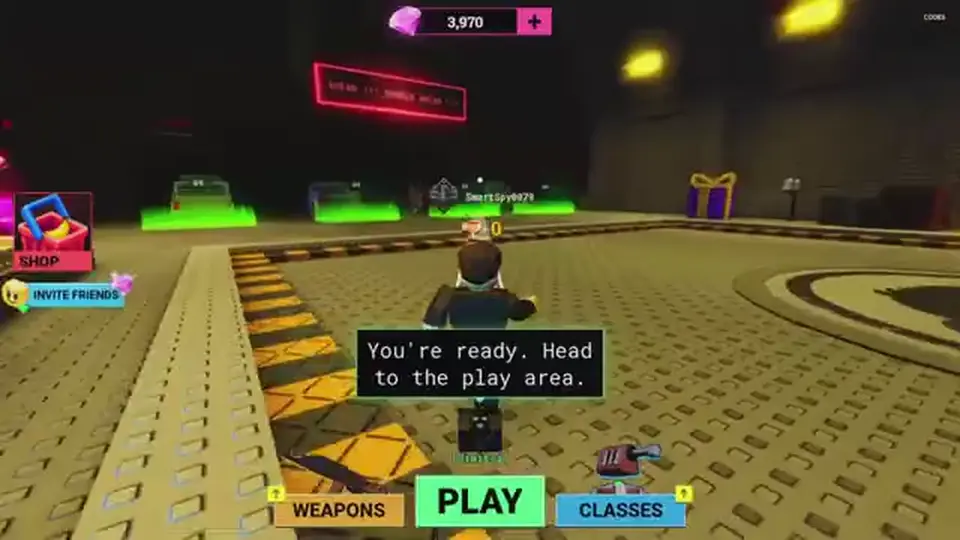
After the tutorial, you should be in the lobby — the shell where you pick a class, invite friends, and start a run against rabid monkeys. Public recaps place Codes on the upper-right of this lobby HUD. Exact art can shift when gorilla warfare. ships UI polish, but the pattern is consistent: a labeled Codes entry point, not a buried settings tab.
Mobile, console, and tablet layouts resize buttons, yet the redeem field still expects an exact string from the codes Code column. If you only see gameplay with no lobby shell, exit to menu or finish the current run until the class-select layer returns.
| Screen | What to look for | What it is not |
|---|---|---|
| Lobby after tutorial | Codes text or icon upper-right | In-run pause without redeem field |
| Codes panel open | Single text field + confirm | Chat bar at bottom of screen |
| After confirm | Green check feedback | A Robux purchase modal |
| Place join card | ID 99409088950210 | A different monkey experience |
Roblox · Desktop, Console, Mobile, Tablet. On phone, upper-right may be tighter — rotate or use a larger device if you mis-tap. The paste rules do not change.
Re-run the tutorial trigger by rejoining Place 99409088950210. Confirm you are not inside another Roblox experience. Still stuck? You may be on a build before the Codes UI shipped — check updates for Blasting Off notes, then retry after patch.
When the button is visible, follow the numbered paste order in the next section.
How to redeem Survive a Million Monkeys codes is deliberately boring: one string, one submit, one read of the feedback. The checklist mirrors CODE_REDEEM_STEPS on October 4, 2026.
Open codes, hit Copy on MONKEYS or SURVIVE, and paste into the lobby field. Retyping invites Monkeys vs MONKEYS failures. Never paste the reward column (“1000 Gems”) — only the Code cell.
Press the in-panel confirm control. Wait for the green check. Open whatever Gem readout your lobby shows and confirm +1000 per successful row. No check means the string did not grant — see the failure section instead of hammering Redeem.
Do MONKEYS first because it is official listing copy. Do SURVIVE second only if you want the recap grant. Two green checks mean up to 2000 Gems; one check and one silence means only one string is live for you — stop there.
Success feedback is easy to miss on small screens — the next section describes what “good” looks like.
Matched by build plan, shared topics, and guide progression — not random related links.
A good redeem has three layers: UI acknowledgement (green check), currency movement (Gems increase by 1000 per working row), and no error toast repeating the same string. You do not need to start a horde run to prove the grant — the lobby balance updating is enough.
Screenshot habits aside, the in-game check is what matters for SURVIVE verification. Third-party articles can be early; your lobby is authoritative. If SURVIVE green-checks, treat it like MONKEYS for spending purposes. If it fails silently, do not publish variant spellings to friends — this wiki lists no alternates.
| Signal | Meaning |
|---|---|
| Green check after confirm | Grant accepted for that string |
| Gems +1000 | Matches MONKEYS / SURVIVE reward text |
| No message, Gems unchanged | Stop — typo, expired string, or wrong Place |
| Error mentioning already redeemed | Normal if you repeated the same code |
| Menu locked | Tutorial incomplete or UI bug — rejoin after onboarding |
Codes grant Gems for the horde upgrade track, not Robux for avatar items. A Robux modal means you clicked a shop button, not Codes.
Some builds show Gems only on the upgrade screen. Open upgrades once to confirm the balance moved before you assume failure.
Knowing where not to paste prevents false failures — compare the wrong-box table next.
Three common mistakes send correct strings to the wrong sink. Each sink has a legitimate use — none of them is Survive a Million Monkeys code redeem.
| Box | Belongs there | Never paste |
|---|---|---|
| roblox.com/redeem | Roblox platform promo codes | MONKEYS, SURVIVE, or chat “free gem” strings |
| Public experience chat | Coordination with friends | Codes — no bot grants Gems from chat |
| Robux or avatar shop | Paid cosmetics | Any Code cell from this wiki |
| Other Place IDs | That game’s own redeem UI if any | Strings verified only for 99409088950210 |
| Lobby Codes field | One exact Code cell | Reward text, hashtags, or two codes at once |
Players google “Roblox redeem” and land on the catalog promo page. That form never talks to gorilla warfare.’s lobby HUD. Close the tab, re-enter Place 99409088950210, and use upper-right Codes.
Start with typos — leading spaces from mobile paste, lowercase letters, or missing characters. Copy again from the Code column. Next, confirm tutorial completion and Place 99409088950210. Third, ask whether the string is actually listed: only MONKEYS and SURVIVE are verified here.
SURVIVE-specific failures mean the recap grant is not live on your build yet (or never was). That is not fixed by SURVIV or SURVIVE2026 guesses. MONKEYS failing after it worked yesterday points to a patch retiring the key — recheck the Working table on the next publish pass.
Spamming confirm on a glitchy session sometimes soft-locks menus. Rejoin once, paste once. If the green check appears on second try with no Gem change, note the bug and avoid triple submits.
If friends green-check and you do not, compare tutorial flags and typo paste. If nobody green-checks after an update, wait for this wiki to archive the string under expired codes.
Close Codes and spend before ego-queuing a marathon horde. 1000 Gems is one meaningful upgrades purchase — damage or attack speed if you are learning kiting, survivability if you keep dying in chokepoints on map. Pair spending with beginner guide class advice and survival tips movement rules.
Return to Codes only when the Working table adds a new row. Mid-run redeem trips cost downtime while monkeys stack. Leaderboard pushes come after your sheet matches the economy bump codes provided.
Co-op · bring friends on the same server. Gems are personal; co-op still multiplies effective DPS once your upgrades are live. Redeem solo in lobby, then party up.
Copy-ready strings: codes. First run: beginner guide. Spend path: upgrades.
Lobby upper-right Codes after the tutorial. Exact art may shift in Blasting Off, but recaps agree on upper-right in the lobby shell.
Re-copy from the Code column, confirm tutorial completion and Place 99409088950210, then try once more. No check means no grant — do not invent alternate spellings.
Not for MONKEYS or SURVIVE. Use only the in-experience lobby Codes menu.
Yes — same lobby path on listed devices. Use copy-paste carefully to avoid trailing spaces.
Typically once per account per code. A second attempt should error as already redeemed if the first green-check succeeded.
Matched by build plan, shared topics, and guide progression — not random related links.